



Skip to content

Talk to your departed
loved ones

Clone the voice of your deceased loved ones and engage in meaningful conversations

Bring them back to life
TRUSTED BY OUR REVIEWERS
NewLive video calls

Now you can see them, too

RightBack.ai is no longer just audio. From a single photo and a few of their voice notes, you can have a live video call with your loved one: their face on screen, their own voice answering you, in real time — just like a video call.

1

Watch their welcome

One photo becomes a moving portrait that smiles and says hello.

LIVE
2

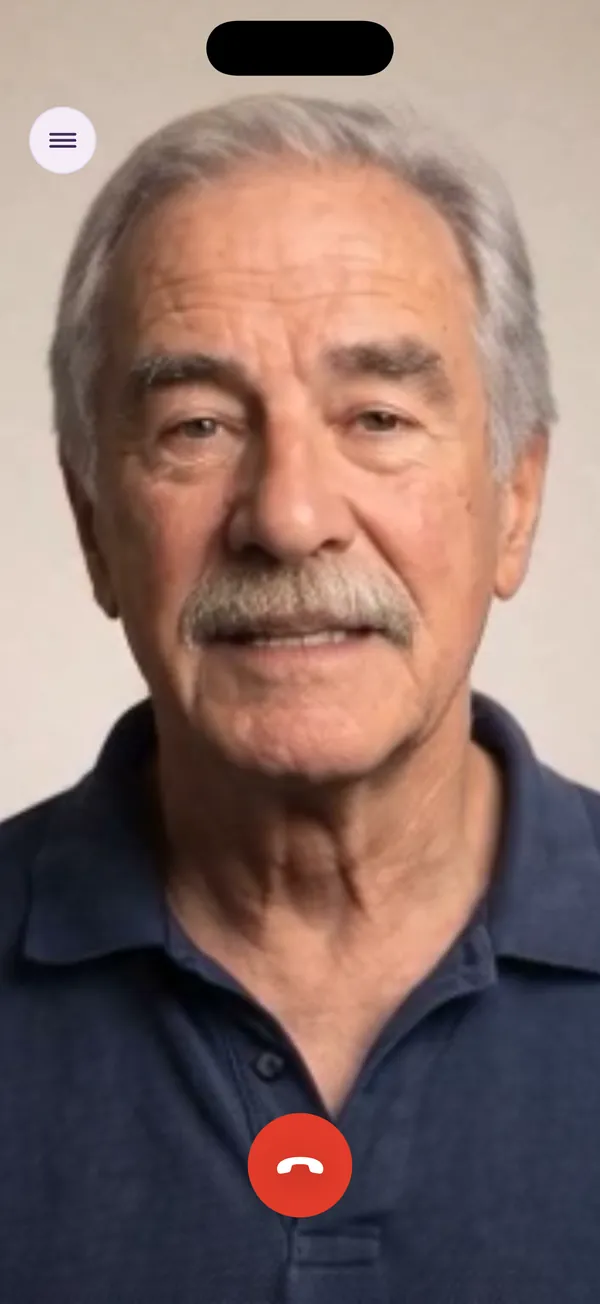
Start the live video call

A real call with Pedro, recorded in the RightBack.ai app.

Their face, from one photo

Any photo works, even a family picture. We turn it into a portrait that moves, blinks and smiles.

Their real voice

Recreated from the WhatsApp voice notes you already have — not a generic synthetic voice.

In real time

Just talk. They listen and answer right away, with their way of speaking. No buttons to hold.

Full screen, like a video call

Face to face, the way you used to talk. Hang up whenever you want.

Try a video call

Available on iPhone. An AI recreation made to help you remember — not the person themselves.

Live video calls

Step by step: Pedro's first video call

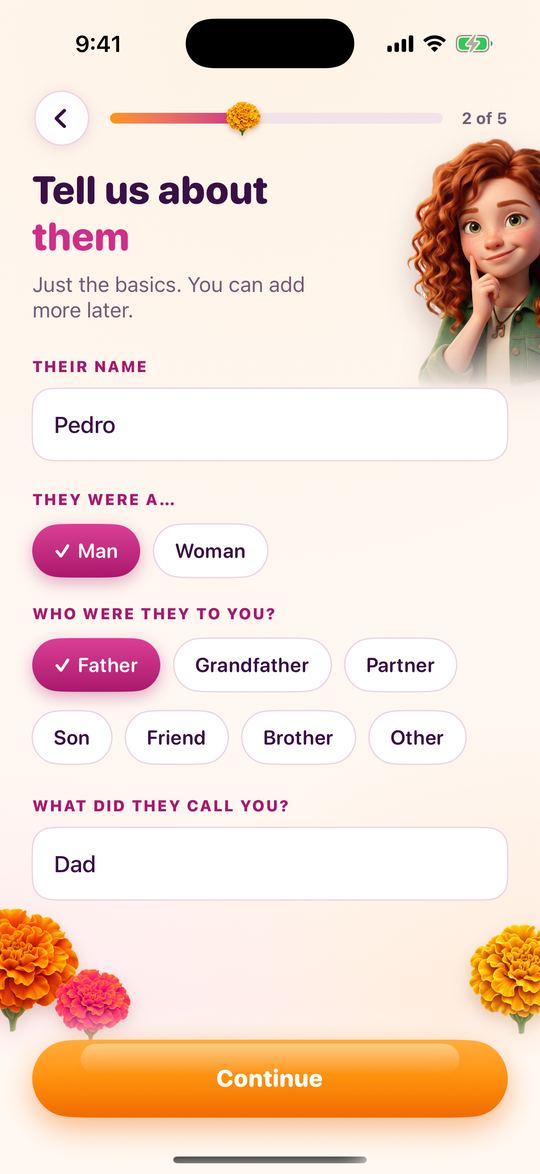
  1. Telling RightBack.ai about Pedro: name, relation and nickname

    1Tell us about them

    Their name, who they were to you and what they used to call you. That's all to start.

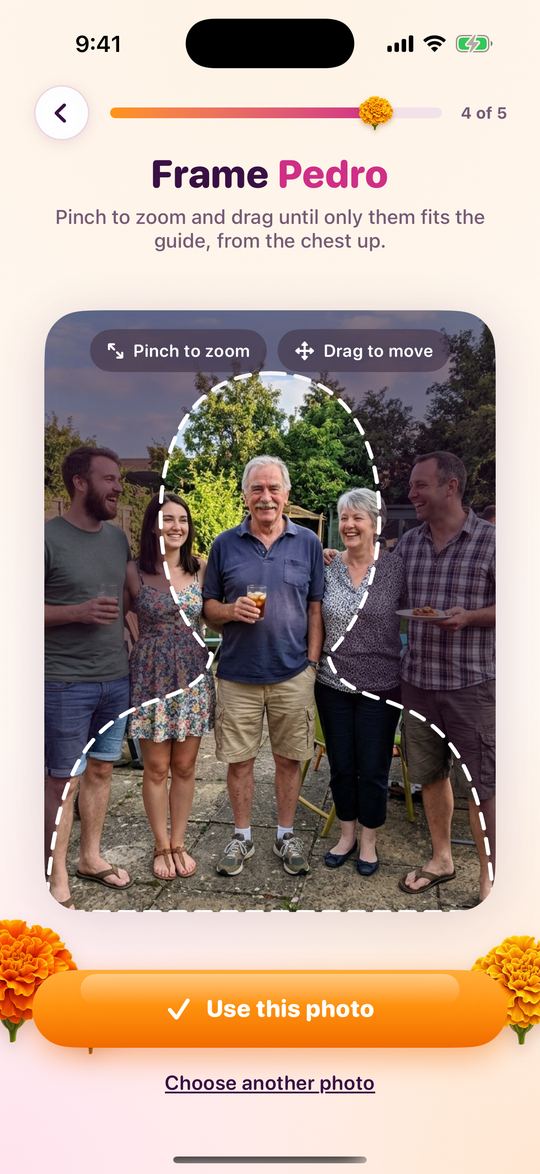
  2. Framing Pedro in a family photo with the bust-shaped guide

    2Choose a photo and frame them

    Even a group photo works: pinch and drag until only Pedro fits the dashed guide, from the chest up.

  3. 3Watch their welcome

    In about a minute the photo becomes a short moving portrait. Pedro smiles and says hello. Tap "Talk to Pedro" or "Watch again".

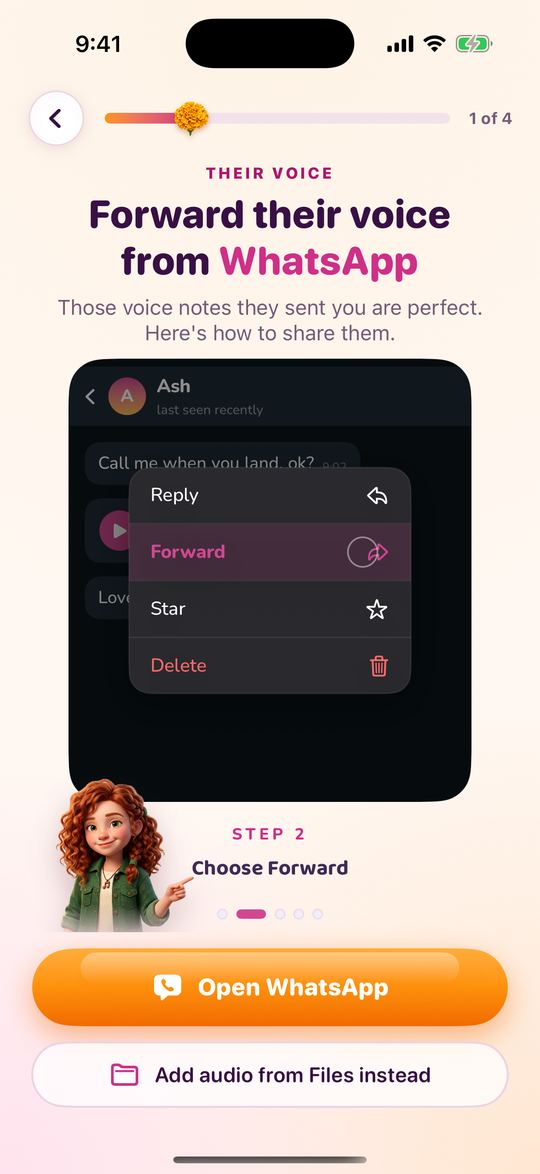
  4. Forwarding Pedro's WhatsApp voice notes to recreate his voice

    4Add their voice

    Forward a few voice notes he sent you on WhatsApp, or add audio from Files. The more you add, the more it sounds like him.

  5. Live video call with Pedro in RightBack.ai

    5Start the live video call

    Pedro appears full screen and answers in his own voice, in real time. Talk as long as your plan allows.

How it works

Reconnect with your Loved Ones

Clone dead person voice with AI

1Upload Audios

Upload clear audio or video samples of your loved one’s voice, sourced from WhatsApp, Telegram, iMessages or Videos.

Clone dead person personality with AI

2Clone their personality

Add personal details, shared experiences, and memories to build a comprehensive profile that mirrors their personality.

Talk with dead person using AI

3Start talking

Engage in conversations through text or voice, and receive responses that sound just like your loved one.

Stories

Why are people cloning their loved ones?

“

Storytelling and Memories

I cloned my late mother's voice, allowing her to tell bedtime stories to my children. By uploading recordings and personal details, the AI recreated her personality. Now, my kids experience the warmth and love of their grandmother through nightly storytime.

Esther Howard
“

Hearing My Son Again

My son passed away in a car accident. Now, I can hear his voice again, which provides immense comfort and helps me cope with the grief. It's a way to keep his memory alive in a very personal way.

Michael Davis
“

Grandma’s Recipes Again

I cloned my grandmother's voice using Rightback. Now, she reads her famous recipes to me just like she used to. It's a comforting piece of home.

Sarah Johnson
“

Talking to My Brother

My brother died of cancer a few months ago. Using Rightback to talk with his voice brings back wonderful memories and eases the pain. It feels like he's still here with me, sharing moments and conversations we used to have.

Matt Brown
Their voice notes

How to Export Audios from WhatsApp or Telegram

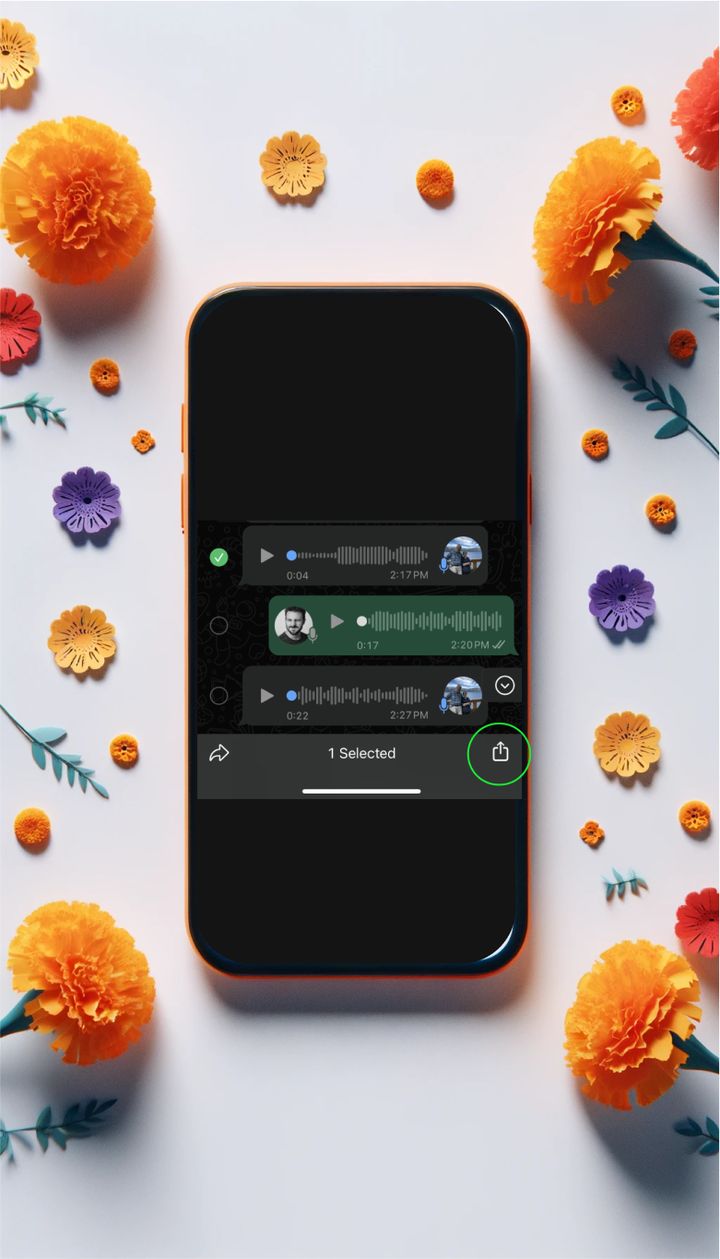
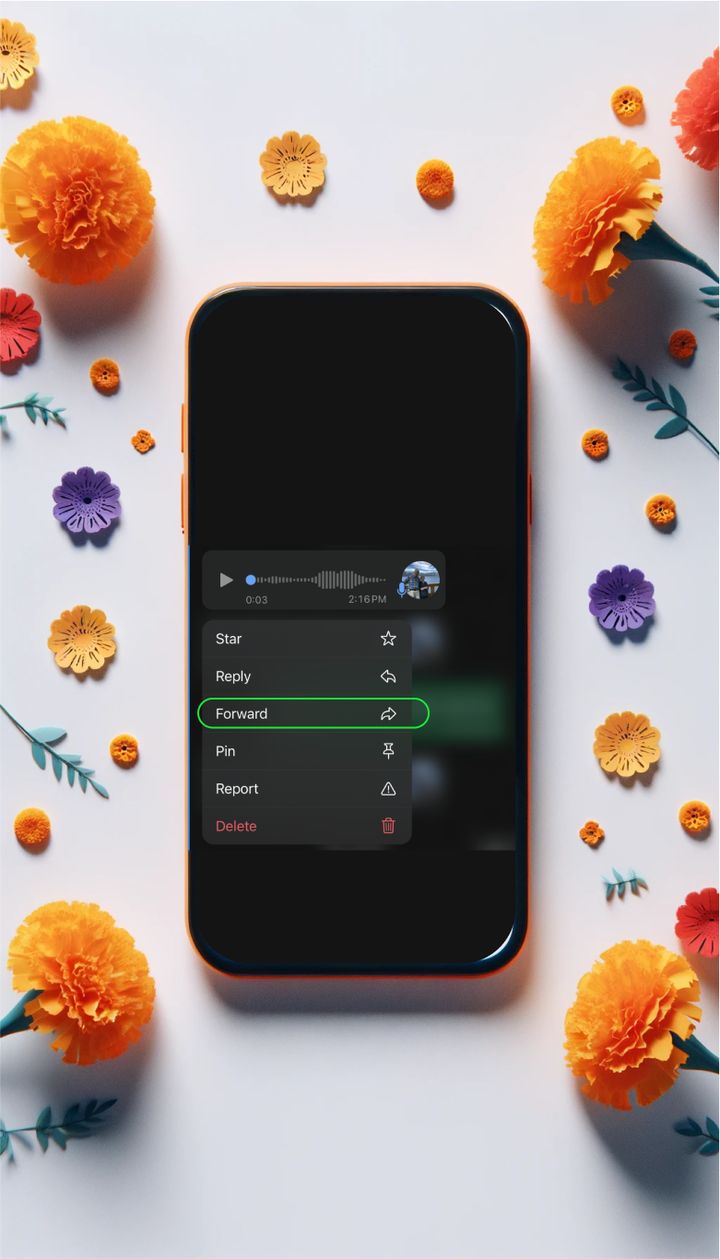
Tap and hold a WhatsApp voice note, then tap Forward

1Select Message

Tap and hold the audio message until the options menu appears, and tap on “Forward”

Tap the Share icon at the bottom right

2Share

Tap on the “Share” icon at the bottom right

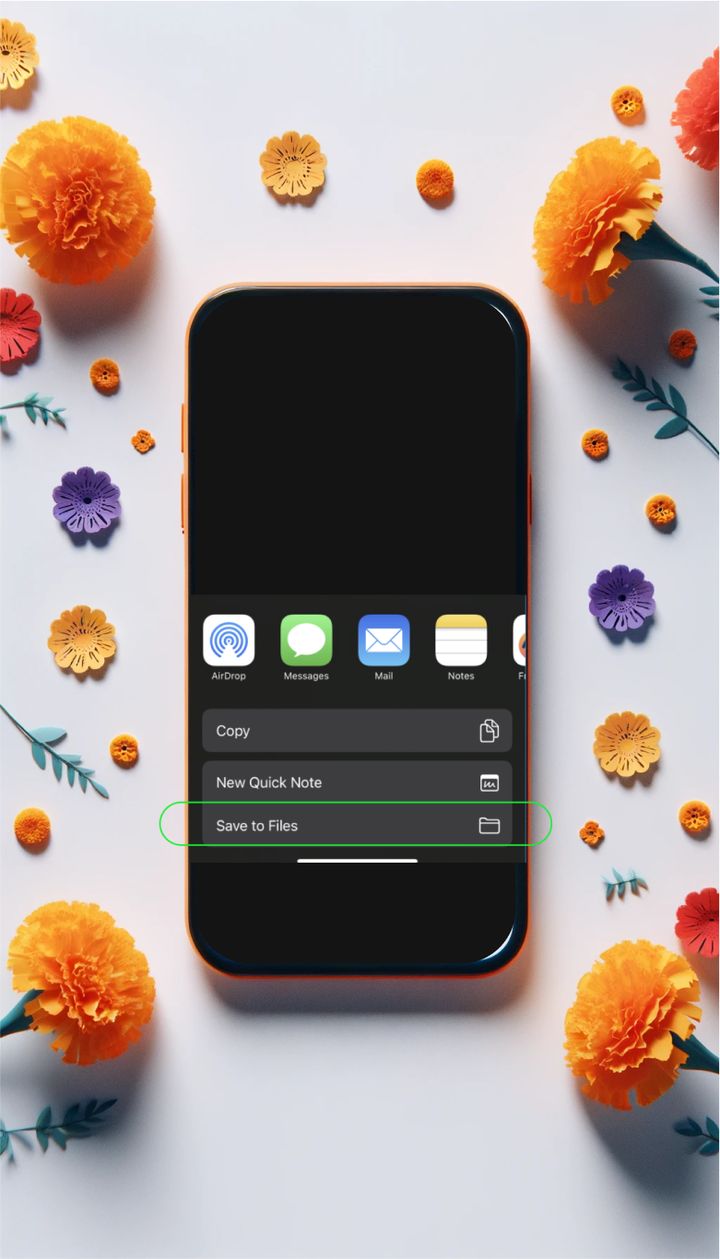
Choose Save to Files from the share menu

3Save to files

Select the "Save to Files" option from the share menu that appears.

FAQS

You Got Questions? We got
Answers!

What is RightBack.ai?

RightBack.ai is an iPhone app that lets you hear — and now see — a loved one who has passed away. From a few of their WhatsApp voice notes, it recreates their voice with AI so you can talk to them in a live, spoken conversation: they listen and answer in real time, with their own way of speaking.

Add a single photo and the conversation becomes a live video call, with their face on screen and their voice answering you. You shape their personality with the details only you know — nicknames, expressions, shared memories — so every conversation feels like them. It is an AI recreation made to help you remember and grieve, not the person themselves.

Is there an AI for loved ones who died?

Yes. RightBack.ai is built for exactly that: an AI that recreates the voice and the face of someone who has died, so you can talk with them again. You start with what you already have — voice notes from WhatsApp or Telegram, and a photo if you would like video calls.

The app recreates their voice, turns their photo into a portrait that moves and smiles, and uses the memories and personality details you share to answer the way they would. People use it to say what they never got to say, to hear a familiar "good morning" again, or to let their children hear a grandparent's voice.

How do you recreate someone's voice who has passed away?

It takes a few minutes in the app:

  1. Tell us about them — their name, who they were to you and what they used to call you.
  2. Add a photo (optional). Even a group photo works: frame just their face, and in about a minute you will see a short welcome video of them saying hello.
  3. Add their voice. Forward voice notes from WhatsApp or pick audio files from your iPhone. At least 10 seconds works; around 3 minutes of clear audio sounds the most like them.
  4. Describe their personality — the phrases they used, their sense of humor, the topics they loved.

Then tap "Talk" and start a live voice or video call with them.

Is it free to create a voice clone?

Setting everything up is free: create their profile, add their voice notes and photo, and watch their welcome video before you pay anything.

Talking with them — live voice and video calls — requires a subscription through the App Store. Plans start at $3.99 per week in the US (prices vary by country), and each plan includes a set number of call minutes per week or month. If you need more time you can move to a plan with more minutes, and you can cancel whenever you want from your iPhone settings.

How accurate is the voice cloning?

With good recordings, very close. Accuracy depends mostly on the audio you provide: around 3 minutes of clear voice notes, where they speak naturally and without background noise or music, gives the most lifelike tone, rhythm and accent. Choosing their language and accent in the app helps too.

The personality details you add — favorite phrases, humor, how they addressed you — make the conversation feel like them, not just sound like them. It is still an AI recreation: it only knows what you tell it, so the more memories you share, the more it sounds like the person you remember.

Is my data secure?

Yes. The details you type and the audio files you add are stored on your iPhone. Nothing is sent until you review and accept the consent screen; after that, only what is needed to recreate the voice and the video portrait goes to our AI service providers, over encrypted connections. We do not sell your data or use it for advertising.

When you delete a voice in the app, it is also deleted from our providers, and voices you stop using are removed automatically after 30 days. You can read the details in our Privacy Policy.

What languages are supported?

Your loved one can speak in more than 30 languages, including English, Spanish, Portuguese, French, Italian, German, Dutch, Polish, Romanian, Greek, Turkish, Arabic, Hindi, Japanese, Korean, Chinese, Indonesian, Filipino and Vietnamese.

You choose the language they spoke and, for many languages, their accent — for example American, British or Irish English; Latin American, Castilian or Argentine Spanish; Brazilian or European Portuguese. The app itself is available in English, Spanish, Portuguese and French.

Can I use the service on mobile devices?

Yes — RightBack.ai is a mobile app for iPhone, available on the App Store. Everything happens in the app: creating their profile, forwarding voice notes straight from WhatsApp, and talking through live voice and video calls, full screen like a regular video call.

You need an iPhone with a recent version of iOS and an internet connection during calls.

How many audio samples can I upload?

What matters is not the number of files but the total time and quality of their voice. At least 10 seconds is enough to start, and around 3 minutes of clear audio gives the most lifelike result. As you add recordings, the app shows a meter so you know when you have enough.

Choose voice notes where they speak naturally, close to the phone, with little background noise. You can add more recordings later from their profile to make the voice even closer to theirs.

What file formats are supported?

You can add voice notes exactly as they come from WhatsApp or Telegram (OGG/Opus), or audio files saved on your iPhone in M4A, MP3 or WAV.

The easiest way is to forward the voice notes straight from a WhatsApp chat to RightBack.ai using the share menu — no converting needed. If the only recording you have is inside a video, save its audio as a file first and add it from the Files app.

Can I add more information to the profile after creating it?

Yes. Tap the pencil on their card at any time to edit their profile: change the name or photo, add more voice notes to make the voice closer to theirs, or update their personality with new phrases, stories, nicknames, places and memories.

The next conversation uses everything you have added, so their profile becomes richer the more you share.

How does the AI learn and evolve?

The AI does not change on its own. Every conversation is built from the profile you create: their voice, their personality, and the memories and details you add.

To make them feel more like themselves, edit their profile — add the expressions they used, stories you lived together, the people they talked about — and your next call reflects it. That way you stay in control of how they are remembered.

Can I interact with the AI via text?

Conversations in RightBack.ai are spoken: you talk out loud and they answer with their own voice, in real time. With a photo you can also see them during a live video call.

There is no chat window to type in — the app is designed to feel like calling them, so you can just talk naturally, the way you used to.

Can the AI understand and speak different dialects?

Yes. When you create the voice you pick their language and, for many languages, their accent — such as American, British, Irish, Scottish or Indian English; Latin American, Castilian or Argentine Spanish; Brazilian or European Portuguese.

The voice notes you add also carry their own pronunciation, so the recreated voice keeps the way they really spoke. You can add regional expressions they used to their personality as well.

Is there a limit to the number of conversations I can have?

There is no limit on how many conversations you start — call them as often as you like. Each plan includes a number of call minutes per week or month, which you can check in the app under "Time left"; minutes renew automatically with your plan.

If you need more time, you can switch to a plan with more minutes directly from the app.

Can I export conversations with the AI?

Not at the moment. Calls happen live, like a phone call, and the app does not keep recordings or transcripts to export.

If there is a moment you want to keep, you can use your iPhone's built-in screen recording during the call.

What happens if I exceed the 10 MB limit per audio sample?

Most voice notes are far below any size limit. If a long recording cannot be added, trim it to the part where they speak clearly, or split it into shorter clips.

Several short, clean clips work better than one long recording with noise or other people talking.

How do I cancel my subscription?

Subscriptions are managed by Apple. On your iPhone, open Settings, tap your name, then Subscriptions, choose RightBack.ai and tap Cancel Subscription. You keep access until the end of the period you already paid for.

Deleting the app does not cancel the subscription, so make sure to cancel it in Settings.

Is there customer support available?

Yes. Write to us at [email protected], use "Contact Us" in the app menu, or visit our Help page. A real person reads every message and gets back to you as soon as possible.

Ready to Reconnect?

Experience the joy of hearing your loved ones' voices again. Start your journey with RightBack.ai and keep their memories alive through meaningful conversations.

Bring them back to life